Uploading videos with very high file size on the internet or any social media platform is something we all try to avoid due to obvious reasons.
Whether you are a content creator, a videographer, or simply sharing videos with friends and family, it’s essential to optimize the size of your videos without compromising on quality.
So in this Post on how to compress videos without losing quality i’ll try my best to guide you through the best practices and techniques to compress your videos without losing quality.
What is Video Compression?
Now, Before we dive into the methods of How to compress Videos without losing Quality, it’s important to grasp the concept of video compression itself.
Video compression is the process of reducing the file size of a video without significantly degrading its visual and audio quality.
It achieves this by eliminating redundant or unnecessary data from the video file.
Check Out: How to recover deleted photos from your digital camera
Video compression is crucial for various reasons:
- Efficient Storage: Compressed videos take up less storage space, allowing you to store more videos on your devices or servers.
- Faster Upload and Streaming: Smaller video files can be uploaded or streamed more quickly, enhancing the user experience.
- Bandwidth Optimization: Compressed videos consume less bandwidth when transmitting over the internet, making them easier to share and view online.
What is Lossless and Lossy Compression?
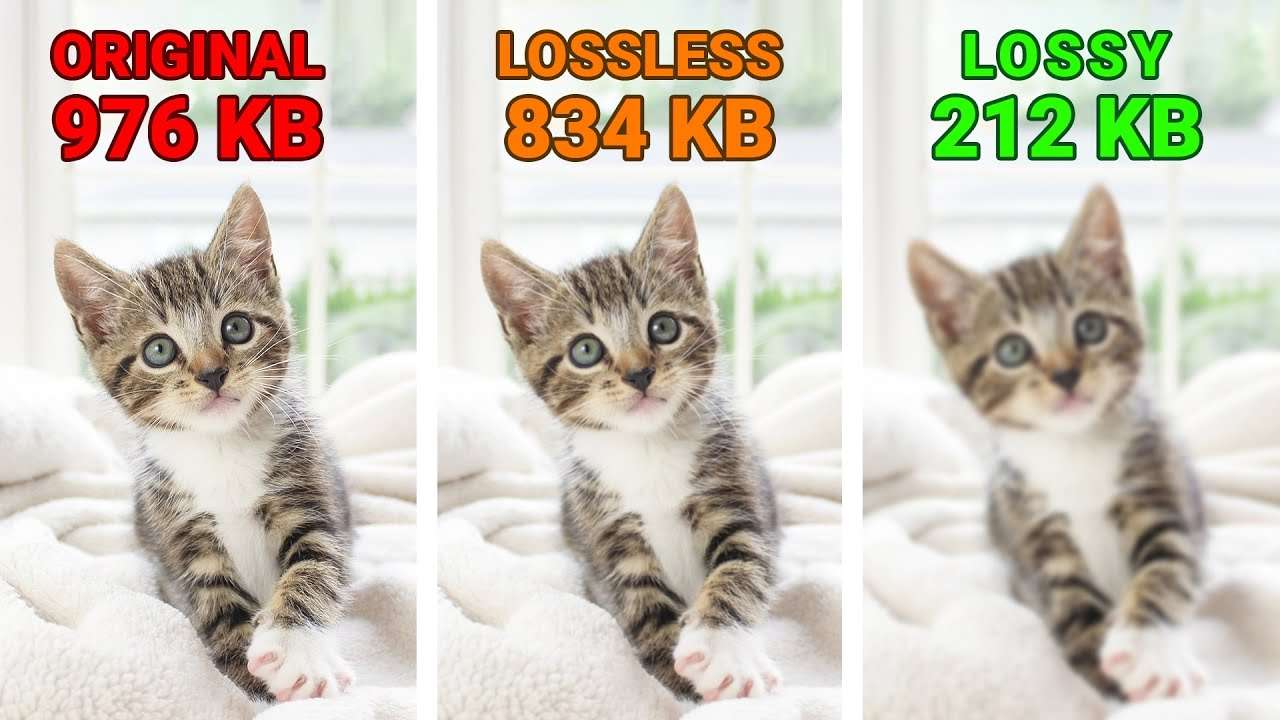
Video compression techniques can be broadly categorized into two types: lossless and lossy compression.
Lossless Compression
Lossless compression algorithms reduce the file size of a video without losing any information.
This means that the compressed video is an exact replica of the original, resulting in no loss of quality.
However, lossless compression often achieves less compression compared to lossy techniques.
Lossy Compression
Lossy compression algorithms achieve higher levels of compression by selectively discarding certain data.
This results in a smaller video file but introduces some loss of quality.
The degree of quality loss depends on the chosen compression settings and the specific video content.
Tips on How to compress Videos without losing Quality
Adjusting Video Resolution and Frame Rate
One of the most effective ways to reduce video file size is by adjusting the resolution and frame rate of the video. Here’s how you can optimize these settings:
- Video Resolution: If you don’t need high-definition (HD) quality for your videos, consider reducing the resolution. For example, if your original video is in 4K resolution, downsizing it to 1080p or even 720p will significantly reduce the file size without noticeable quality loss.
- Frame Rate: The frame rate determines the number of individual frames displayed per second in a video. Lowering the frame rate can significantly reduce the file size. Consider reducing the frame rate from 60fps to 30fps or even 24fps, depending on your specific needs.
Choosing the Right Video Codec
A video codec is a software or hardware algorithm that compresses and decompresses video files. Choosing the right codec is crucial to maintain video quality while achieving optimal compression. Here are some popular video codecs to consider:
- H.264/AVC: This codec offers a good balance between video quality and compression efficiency. It is widely supported and compatible with various devices and platforms.
- H.265/HEVC: H.265 is a successor to H.264 and provides superior compression. It offers better video quality at lower bitrates but requires modern devices and software support.
- VP9: Developed by Google, VP9 is an open-source video codec that provides efficient video compression. It is commonly used for web-based video streaming and enjoys broad browser support.
Adjusting Bitrate and Quality Settings
The bitrate of a video determines the amount of data used to represent each second of the video. Higher bitrates generally result in better video quality but also larger file sizes. Consider adjusting the bitrate of your videos to find the right balance between size and quality.
Furthermore, many video compression tools allow you to adjust quality settings such as quantization parameters, entropy coding, and motion compensation. Experimenting with these settings can help achieve the desired compression without significant quality loss.
Utilizing Video Transcoding Tools
Video transcoding tools play a crucial role in compressing videos without sacrificing quality. These tools convert videos from one format to another while applying compression algorithms. Consider the following features when choosing a video transcoding tool:
- Batch Processing: Tools with batch processing capabilities can compress multiple videos simultaneously, saving time and effort.
- Customizable Compression Settings: The ability to customize compression settings gives you fine-grained control over the output video quality.
- Preview and Comparison: Tools that provide a preview or side-by-side comparison of the original and compressed videos help ensure the desired quality is achieved.
Conclusion
So, Compressing videos without losing quality is very important especially if you need the quality of the Video to be flawless.
To master this process you must understand the video compression techniques, how to adjust video settings, and how to utilize the right tools, so you can significantly reduce video file sizes while maintaining satisfactory visual and audio quality.
Experiment with different settings, codec options, and compression tools to find the optimal balance between quality and size for your specific needs.
Remember, whether you are a professional content creator or an everyday video enthusiast, efficient video compression ensures faster upload and streaming, improved storage capacity, and seamless sharing of your videos across various platforms.
For more understanding about How to compress Videos without losing Quality using Lossless vs Lossy Video Compression Methods Check out this Video