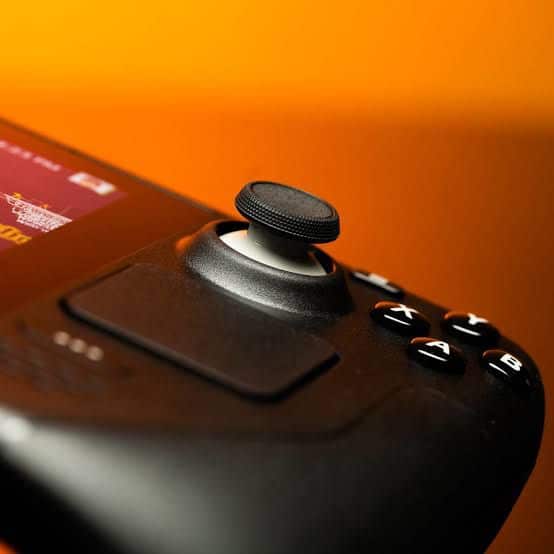

Trying to enjoy Gaming can become a frustrating journey when faced with the persistent issue of stick drift, a common problem that affects consoles like Xbox and PlayStation.
This malfunction where the analog sticks on a controller move cursor or character without input, diminishes the gaming experience, making precise control a challenge.
Recognizing how to fix stick drift is crucial for gamers and tech enthusiasts alike, not only to enhance their gaming sessions but also to extend the lifespan of their beloved controllers.
Our discussion will go into effective solutions to address and rectify this issue, ensuring your gameplay is as smooth and responsive as it should be.
Don't MIss This Guide

We will begin by identifying the cause of stick drift, a necessary step to understand the most effective remedies.
Following this, our focus shifts to how to fix stick drift on different controllers, including specific tips on how to fix stick drift PS5, among other platforms. Also, Preventative measures to avoid future stick drift will also be highlighted, offering guidance on maintaining your controller in prime condition.
And by the conclusion of this article, you will be equipped with the knowledge and techniques to tackle stick drift, ensuring a seamless and enjoyable gaming experience.
Identifying the Cause of Stick Drift
Identifying the root cause of stick drift in game controllers is crucial for effective resolution. Stick drift occurs when a controller registers input from the analog sticks without any physical interaction from the user.
Don't MIss This Guide
This issue commonly stems from the wear and tear of components inside the analog stick, such as the carbon strike plate in the thumb stick module, which degrades over time due to repeated use.
Additionally, potentiometer sensors, which read the stick’s position, can fail due to manufacturing defects or general wear.
Difference Between Analog Stick Drift and Controller Defects
Analog stick drift specifically refers to the scenario where the controller’s analog sticks send input signals without being touched.
This is often confused with general controller defects, which may include other types of malfunction such as unresponsive buttons or connectivity issues.
Stick drift is primarily caused by mechanical or electrical issues within the stick assembly itself, such as dirt accumulation or worn-out components.
Tools for Diagnosing Stick Drift Issues
To diagnose stick drift, tools like the game controller settings in Windows or the Gamepad Tester website can be utilized. These tools help in visually identifying any drift in the controller’s analog sticks by displaying real-time feedback on stick movement and position.
For a more detailed analysis, testing the circularity of the analog stick’s movement can reveal dead zones or irregular responses, which are indicative of potential stick drift.
Fixing Stick Drift on Different Controllers
Xbox Controllers
To address stick drift in Xbox controllers, start by cleaning the controller with a dry cloth to remove grime, then use cotton swabs dipped in isopropyl alcohol for a deeper clean around the analog sticks.
Adjusting the deadzone settings can also be beneficial; access this through the Settings menu under Devices & Accessories on your Xbox console.
If these steps do not resolve the issue, consider updating the controller’s firmware or, as a last resort, disassembling the controller to clean or replace the analog stick components.

PlayStation Controllers
For PlayStation controllers experiencing drift, begin by resetting the controller. If the drift persists, clean around the analog sticks with a microfiber cloth and a solution of water and isopropyl alcohol.
For more stubborn cases, disassembling the controller might be necessary to access and clean the internal components directly.
If you’re comfortable with more advanced repairs, replacing the analog sticks and their potentiometers might be required.
Nintendo Controllers
Fixing drift in Nintendo controllers, particularly the Joy-Cons, starts with recalibrating the controllers through the Switch’s settings menu.
If recalibration doesn’t help, use compressed air and a cotton swab lightly dampened with alcohol to clean the base of the control stick where the sensor is located.
For controllers out of warranty, replacing the joystick might be a viable solution, with many affordable kits available online.
Third-Party Controllers
When dealing with third-party controllers, the steps to fix stick drift can vary depending on the manufacturer’s design.
Don't MIss This Guide
Generally, start with recalibration and cleaning. If accessible, adjust the deadzone settings through the controller settings menu.
For persistent drift issues, professional repair or replacement of the thumbsticks might be necessary.
Always check the warranty and support options from the manufacturer before proceeding with DIY repairs.
Preventative Measures to Avoid Future Stick Drift
To safeguard your gaming controllers against stick drift, we can adopt several preventative measures.
Regular Cleaning Routines
A fundamental step is to maintain regular cleaning routines. Before each gaming session, make it a habit to wash your hands to minimize the transfer of dirt and oils to your controller.
After playing, use a soft, lint-free cloth slightly dampened with mild soap and water to clean the device.
For a deeper clean, pre moistened alcohol wipes are effective, especially around the joystick and buttons, where grime accumulates most.
Avoid eating while gaming, as food residues can exacerbate the buildup of debris and potentially contribute to stick drift issues.
Establish a schedule to thoroughly clean your gaming setup every three to six months, depending on how frequently you use it.
Storage Tips
Proper storage of your controllers when not in use is also crucial. Store them in a cool, dry place away from direct sunlight and extreme temperatures to prevent wear and tear on internal components.
Using a controller case or a dedicated storage container can protect the device from dust and other environmental factors.
For those with multiple controllers, consider organizing them in a way that prevents clutter and accidental damage—perhaps using a drawer or specialized holder, which can also keep them within easy reach.
Conclusion
Throughout this exploration of rectifying stick drift issues, we’ve covered a breadth of valuable strategies tailored to various gaming consoles, including Xbox, PlayStation, Nintendo, and even third-party controllers.
Key insights were shared on diagnosing the root causes of stick drift, ranging from wear and tear to the accumulation of debris, alongside practical remedies such as cleaning techniques, controller recalibration, and hardware adjustments.
Additionally, the significance of preemptive measures, including regular cleaning and proper storage, was emphasized to safeguard against future occurrences, underscoring the importance of maintaining gaming gear to enhance durability and performance.
The journey to combat stick drift not only enhances the gaming experience but also extends the lifespan of our cherished gaming controllers.
By applying the outlined strategies, gamers can ensure their devices remain in optimal condition, ensuring precise control and uninterrupted gameplay.
This discourse not only arms readers with the knowledge to tackle present issues but encourages a culture of maintenance and care within the gaming community.
As technology evolves and new challenges emerge, the insights shared here stand as a testament to the resilience and adaptability of gamers in preserving the integrity of their gaming sessions.
FAQs
1. How can joystick drift be permanently repaired?
Permanently repairing joystick drift can vary based on the type of controller and the severity of the drift. However, common methods include adjusting the controller’s input threshold settings, cleaning the joystick mechanism to remove dust and debris, or replacing the joystick module if necessary. For a more lasting solution, ensure that the controller’s firmware is always up to date.
2. What are some ways to fix stick drift on an Xbox controller without using any tools?
To fix stick drift on an Xbox controller without using tools, you can try recalibrating the controller through the console’s settings. Additionally, re-syncing the controller with the console or resetting the controller by pressing the small button on the back can sometimes resolve minor drift issues.
3. How can I eliminate drift from my PlayStation controller stick?
To fix stick drift on your PlayStation controller, start by adjusting the input threshold in the controller settings. If this doesn’t help, try resetting your PS5 DualSense controller using the small reset button on the back. Cleaning the analog stick with a dry cloth or compressed air can also be effective. Ensure your controller’s software is up-to-date, and try turning off the Bluetooth function and then turning it back on.
4. Does PlayStation offer free repairs for stick drift issues?
If your PS5 controller is still under warranty, Sony may address the stick drift issue at no cost to you. They might fix the controller or replace it. If out of warranty, you might consider opening up the DualSense controller to replace the sticks yourself or seek a professional repair service.