


There’s no single answer to what a laptop should cost, because “good” depends entirely on what you’re doing with it. A machine that’s perfect for typing assignments will make a developer miserable.
So here’s what each budget actually gets you in the Nigerian market right now, and the one thing worth checking before you look at price at all.
Some links in this article are affiliate links. If you buy through them we may earn a small commission at no extra cost to you, and it helps keep guides like this free.
Check the Processor Generation First
This has quietly become the most important number on any UK used laptop listing, and it’s the one sellers are least likely to volunteer.
Windows 10 stopped receiving security updates in October 2025. Windows 11 officially requires an 8th generation Intel Core processor or newer, along with TPM 2.0 and Secure Boot. A 6th or 7th generation machine can’t be upgraded through the official route, which means it’s running an operating system that no longer gets patched.
You’ll still see 6th and 7th gen laptops advertised with “Windows 11 activated.” Sellers can install it using workarounds, and it does run. What you don’t get is guaranteed updates, and Microsoft is explicit that unsupported installs may stop receiving them.
How to read the generation from the model number: an i5-8250U is 8th gen, an i5-7200U is 7th gen, an i7-10510U is 10th gen. It’s the first digit or two after the dash. If a listing only says “Core i5” with no model number, ask for it before you go any further, because “Core i5” spans about a decade of very different machines.
An 8th gen i5 will outrun a 6th gen i7 in daily use, so generation beats the i5-versus-i7 question almost every time.
What Else Moves the Price
Beyond the generation, five things decide what a seller charges: RAM size, whether storage is SSD or the older HDD, the physical condition grade, whether the original charger is included, and how reliable the seller is.
That condition grade is worth knowing about. Importers grade laptops roughly as Grade A for near-new with minimal marks, Grade B for visible wear but fully functional, and Grade C for heavy cosmetic damage. Two identical specs can differ by ₦50,000 purely on grade, so ask which one you’re being offered rather than assuming.
₦90,000 to ₦180,000: Basic, With Real Compromises
This is where the entry level actually starts, lower than most people expect. Acer Aspire and Swift models sit here, along with older Dell Latitude and ThinkPad units.
Expect a 6th or 7th generation Core i5, 4GB or 8GB of RAM, and often an HDD rather than an SSD. Battery life will be modest and the body will show its age.
It’ll handle typing assignments, browsing and online classes. It won’t handle heavy multitasking, coding projects or design software, and it almost certainly won’t get Windows 11 officially.
If this is your ceiling, prioritise an SSD and 8GB of RAM over a slightly newer processor. Both can be upgraded cheaply afterwards, and an SSD transforms an old machine more than anything else you can spend money on.
₦180,000 to ₦280,000: Where Most People Should Land
The sweet spot, and the range where a UK used laptop genuinely beats a brand new one at the same money.
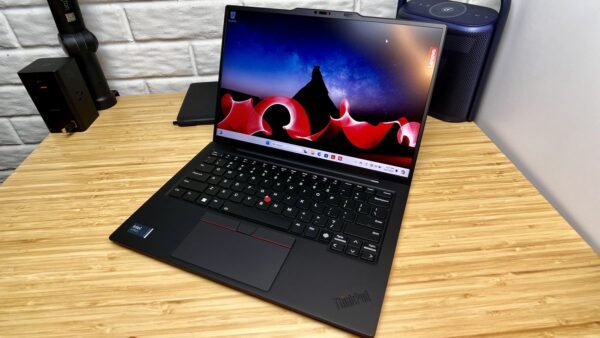
Dell Latitude models like the 5480 and 5490, HP EliteBook 840 G5 and ProBook 440 G5, and Lenovo ThinkPad T480 and L490 all live here. Expect a Core i5, 8GB of RAM and a 256GB SSD, with 8th generation and above becoming common toward the upper end.
These are business-class machines built for daily use in offices, which is exactly why they hold up. Good for students, office workers, small business owners and most remote jobs.
If you can stretch to the top of this band, do. The difference between a 7th gen at ₦190,000 and an 8th gen at ₦260,000 is the difference between a laptop that’s already at the end of its supported life and one with years left.
You can browse tested UK used laptops on Shopinverse to compare what’s available in this range against local market prices.
₦280,000 to ₦400,000: Comfortably Fast
At this level things feel modern rather than merely adequate.
Expect 8th to 11th generation Core i5 or i7, 16GB of RAM in many cases, a 256GB or 512GB SSD, a better screen, and often a backlit keyboard and fingerprint reader. HP EliteBook 840 G6 and G7, ThinkPad T490, and ProBook 440 G8 and 640 G8 are typical.
This is the range for developers, designers and anyone doing serious multitasking. If you run virtual machines, Docker, Android Studio or Adobe software, 16GB of RAM stops being a luxury and starts being the thing that decides whether your day is pleasant. Our guide to UK used ThinkPads for Nigerian developers goes into the specific models worth chasing.
₦400,000 and Above: Premium
Newer generation processors, 16GB or more of RAM, strong battery health, premium build quality, and often a higher resolution display.
MacBook Pro models from 2017 to 2019 land in the ₦350,000 to ₦650,000 range and are worth considering if you’re in a Mac workflow, though bear in mind that the older ones have their own support cutoff coming and the butterfly keyboards on some 2016 to 2019 models had well-documented reliability problems.
This is the range for people whose income depends on the machine working every day.
You can check premium UK used laptops on Shopinverse if you want units that have been tested before shipping.
The Cheap Ones That Cost You More
Some laptops are cheap for reasons that show up in month two.
Avoid 4GB of RAM, which Windows 11 alone will eat before you open anything. Avoid HDD storage, since the difference between an HDD and an SSD is the difference between a laptop that boots in fifteen seconds and one that takes three minutes. Avoid Celeron, Pentium and Atom processors entirely. And be wary of anything below 8th generation unless the price genuinely reflects it.
Also worth checking before you pay: battery health, since a dead battery on a business laptop can cost ₦30,000 or more to replace. Ask how long it holds a charge unplugged, and be sceptical of “battery is good” without a number.
Our guide on what to check before buying a UK used laptop covers the full inspection list, including screen, ports, keyboard and hinges.
How to Avoid Overpaying
Decide your specs before you go shopping. Walking into Computer Village with “I want a good laptop for about ₦250,000” is how you end up with whatever the seller most wants to move. Walking in with “8th gen or newer i5, 8GB, 256GB SSD, under ₦280,000” is a completely different conversation.
Then compare the same model across at least three sellers, because spreads on identical configurations are wide. Don’t rush, since the first laptop you see is rarely the best price. And buy from someone with a return window, because UK used laptops don’t carry manufacturer warranty and a seller who won’t take it back if it fails in week one is telling you something.
If you’re weighing this against buying new, our comparison of UK used versus brand new laptops in Nigeria lays out the trade-offs, and where to buy reliably covers vetting sellers.
A Discount If You Buy From Shopinverse
If you go the Shopinverse route, use coupon code CHRISTOPHEREBEH at checkout for 5 percent off. Apply it before payment.
You can buy UK used laptops from Shopinverse here.
There’s a decent UK used laptop at almost every budget in Nigeria. Just get the processor generation in writing before anything else, because that single number decides whether you’re buying a machine with years ahead of it or one that’s already at the end of the road.






Join the conversation