

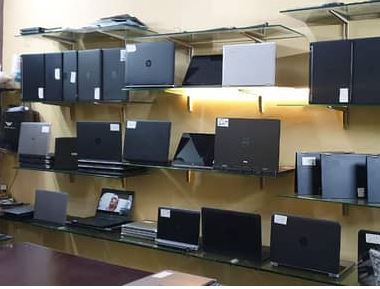
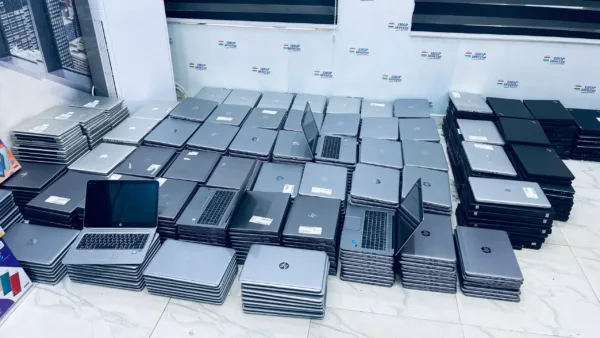
Original UK used laptops in Nigeria are ex-corporate machines from the UK, the US and Europe, and the safest place to buy one is a seller who tests every unit, puts the warranty period in writing and lets you verify the serial number before you pay. Most of the bad experiences you hear about come from laptops whose specs were edited on screen, whose batteries were swapped for cheap cells, or which were rebuilt from mixed parts and sold as clean imports.
It also helps to know that “UK used” is mostly a market name here. A lot of the stock actually comes from the United States, and Shopinverse, one of the bigger online stores for these laptops, labels its own stock USA used. The country matters far less than the laptop’s history, because an HP EliteBook, Dell Latitude or Lenovo ThinkPad that came off a company lease is the same machine whether it was used in Leeds or Texas. The checks below tell you whether the one in front of you is still that machine.
Disclosure: some links in this guide are affiliate links. If you buy through them, GuidesCafe may earn a small commission at no extra cost to you.
The three tricks that turn a clean UK used laptop into a bad buy
The most common one is edited specs. On Windows, the processor name shown on the Settings > System > About page can be altered with a small tweak, so a Core i3 can appear as a Core i5 to anyone who only checks that screen. RAM is easier to inflate in a listing than on the machine itself, which is why a laptop advertised with 8GB sometimes turns out to have 4GB once you look properly.
Battery swaps come next. Some sellers pull the original battery and fit an unbranded cell that holds enough charge to survive a short test in the shop, then fades to 30 minutes of use within a few weeks. Because the laptop powers on and charges normally on the day, you won’t notice until it’s too late to complain.
The third is the rebuilt laptop. These units are put together from motherboards, screens and keyboards taken from different donor machines, and they can look perfectly clean on the outside. They often work for a while, but mixed parts are exactly where the motherboard and display faults that show up two or three months later tend to come from.
How to check a UK used laptop is original before you pay
None of these checks need special skills, and the whole routine takes about 15 minutes. If a seller won’t give you that time with the laptop, treat it as your answer and move on.
Run the serial number through the manufacturer’s own website
The serial number tells you what the laptop was when it left the factory, so it’s the best single check you can do. You’ll find it on the sticker underneath the laptop, and you should also find it inside the BIOS screen, which you reach by pressing F2, F10 or F1 (depending on the brand) as the laptop starts. The two numbers must match. If they don’t, the motherboard has been replaced, and you’re no longer looking at an original unit.
Next, type the serial into the maker’s support site. HP’s warranty check page, Dell’s support site and Lenovo PC Support will show you the exact model, and Dell in particular lists the original processor, RAM and storage the laptop shipped with. When the model name on the website doesn’t match what the seller told you, you’ve caught the problem before spending a kobo.
Read the processor and RAM from tools that don’t rely on Windows labels
Since the About page can be edited, confirm the processor in the BIOS screen while you’re there, or download CPU-Z from CPUID, a free tool that reads the chip directly. For memory, open Task Manager > Performance > Memory, which shows the installed RAM and how many slots are in use. A Core i5 “8th Gen” processor should read as something like i5-8250U or i5-8350U, and the number after the dash is what tells you the generation.
Pull a battery report in 30 seconds
Windows can tell you exactly how worn the battery is. Open Command Prompt, type powercfg /batteryreport and press Enter, then open the battery-report.html file it saves in your user folder. Compare the Design Capacity with the Full Charge Capacity, and look at the cycle count just below them.
A battery holding above 80% of its design capacity is in good shape. Between 60% and 80% is workable, though you should expect noticeably shorter backup during NEPA outages. Below 60%, either negotiate the price down by the cost of a replacement or keep looking. If the report shows an unfamiliar manufacturer name in place of the laptop’s brand, the battery has been changed.
Make sure it can run Windows 11 and check the activation
Microsoft ended support for Windows 10 in October 2025, so any laptop you buy now should meet the official Windows 11 requirements. In practice, that means an Intel 8th Gen or AMD Ryzen 2000 series processor or newer, plus TPM 2.0, which business laptops from that era have. Older units are cheaper for a reason, and they’ll stop getting security updates sooner.
Then open Settings > System > Activation. Many used laptops, including those from reputable stores, arrive without an activated Windows licence, which isn’t a sign of a fake but is a cost you should plan for. Ask before you pay so you can budget for a genuine licence instead of finding a watermark on the screen a week later.
Test the parts that wear out first
Open Notepad and press every key, including the number row and Enter, because a dead key is a common fault that’s easy to miss. Plug your flash drive into every USB port, charge the laptop with the charger it comes with, open the camera app, play a video to test the speakers and connect to your phone’s hotspot. Open and close the lid a few times to feel for a loose or creaking hinge.
For the screen, open a plain white page at full brightness and look for dead pixels, yellow patches or uneven lighting near the edges, which can point to a replacement panel. Also check the resolution under Settings > System > Display, since many business models were sold in both 1920 x 1080 and the much less sharp 1366 x 768, and the price should reflect which one you’re getting.
| Serial and model | Bottom sticker, BIOS and the maker's support site all match the listing |
|---|---|
| Processor | Same chip in BIOS or CPU-Z as in the listing, not just on the About page |
| RAM | Task Manager, Performance, Memory shows at least what was advertised |
| Battery health | 80% or more of design capacity is good, below 60% means walk away or negotiate |
| Windows 11 support | Intel 8th Gen or AMD Ryzen 2000 and newer, with TPM 2.0 |
| Storage | SSD, not a hard drive (HDD) |
| Screen | 1920 x 1080 preferred over 1366 x 768, with no dead pixels or yellow patches |
If you want an even longer checklist, including BIOS passwords and how to spot a locked company laptop, go through our guide on things to check before buying a UK used laptop in Nigeria.
Where to buy original UK used laptops in Nigeria
You have three realistic routes, and each suits a different kind of buyer. Online stores that test their stock and publish their warranty and return terms are the easiest option if you’re not very technical, buying from outside Lagos, or buying for a child heading to school. You pay a little more for the testing and after-sales support, but you also get a receipt you can use if something goes wrong.
Physical markets such as Computer Village in Ikeja and Banex Plaza in Abuja usually give you the widest choice and the most room to negotiate. They work well when you can run every check above on the spot, or when you bring someone who can. Ask for a written receipt that lists the serial number and any warranty the seller promises, because a verbal promise is hard to hold anyone to later.
Individual sellers on social media and classified sites can have good deals, especially when a person is selling their own laptop. Meet in a public place, test the laptop yourself and don’t pay in full before you’ve seen it working. We’ve compared more stores in our list of trusted places to buy UK used laptops in Nigeria if you want to weigh more options.
Why Shopinverse is a strong pick for most buyers
Shopinverse sells business-grade HP EliteBooks, Dell Latitudes, Lenovo ThinkPads and Microsoft Surface laptops, and it says every device, battery included, is tested before it’s listed. It runs a walk-in store at Maryland Mall, 350 to 360 Ikorodu Road, Maryland, Lagos, which matters if you’d rather see the laptop before paying or need to take it back for a warranty repair. Cosmetic flaws like dents or visible scratches are stated on the product page, so you know what you’re getting before it arrives.
Orders are dispatched within 24 hours of payment, and delivery takes about 24 to 48 hours within Lagos and three to seven business days to other states, with free delivery on orders above ₦200,000. You can also choose a RAM or SSD upgrade on the product page before you check out, which is cheaper and safer than having it done somewhere else later. As a price guide, a 10th Gen Core i5 HP EliteBook 840 G7 with 8GB RAM and a 256GB SSD was listed at ₦398,500 in early October 2026, while sale prices on similar models can be lower.
Like any store, it has terms you should know before buying. The warranty period varies by product and is shown on each product page, so read it before you pay. There’s no pay on delivery, there are no refunds for a change of mind, and you have seven days from delivery to report a wrong, damaged or not-as-described laptop. Most Windows laptops come without an activated licence, and the warranty doesn’t cover screens, normal battery wear, liquid damage or damage from power surges.
If those terms work for you, browse the laptops on Shopinverse and run the serial number of any model you like through the maker’s website before ordering. If you’re still deciding what you can afford, our breakdown of how much a good UK used laptop costs in Nigeria will help you set a realistic budget first.
Protect your money whether you buy online or in person
Pay into a business account in the company’s name and keep the receipt or invoice, because no store will process a warranty claim without it. When the laptop arrives, record one continuous video of the unboxing. Shopinverse asks for shipping damage to be reported within 48 hours, and that video is what settles any dispute quickly.
Run the checks from earlier in this guide on the first day, not the sixth, so you still have time inside the return window if anything is off. Don’t break or remove the warranty seal, and don’t take the laptop to a roadside technician while it’s under warranty, since both void most warranties. Plug it into a surge protector or stabiliser, because power surge damage is excluded by almost every seller in Nigeria and our power supply makes it a real risk.
If a seller refuses to honour the warranty or return terms they advertised, you can file a complaint with the Federal Competition and Consumer Protection Commission (FCCPC). Keep your receipt, the product listing and your chat history with the seller, since those are what the commission will ask for.
Save 5% on your Shopinverse order with this coupon code
If you decide to buy from Shopinverse, enter the coupon code CHRISTOPHEREBEH at checkout to get a 5 percent discount on your order. On a ₦398,500 laptop, that’s a saving of about ₦19,900, which is close to the cost of a decent surge protector.
Add the laptop to your cart, apply the code on the checkout page and confirm the new total before you make payment. You can shop at Shopinverse here and use the code on any eligible order.
What to do first if you’re buying a UK used laptop this week
Set your budget, then shortlist only Intel 8th Gen or Ryzen 2000 models and newer so the laptop stays on supported Windows for years. If you’re torn between used and new, our UK used vs brand new laptop comparison covers where each one makes more sense. Before you pay for any unit, check the serial number on the maker’s website, read the processor from the BIOS and run a battery report.
The practical aim isn’t to find the cheapest laptop on the market. It’s to buy one whose specs you’ve confirmed yourself, from a seller whose warranty and return terms you’ve read, so that if something does go wrong, you have someone to take it back to.







Join the conversation